I use KeePassXC as my password manager and I have configured as follows:
Desktop
I have installed the KeePassXC from the Manjaro repository
And I have checked the following configuration options in order to have a good Firefox integration:
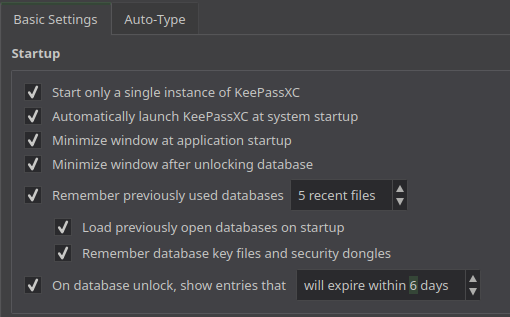
Startup section
-
Automatically launch KeePassXC at system startup
-
Minimize window at application startup
-
Minimize window after unlocking database
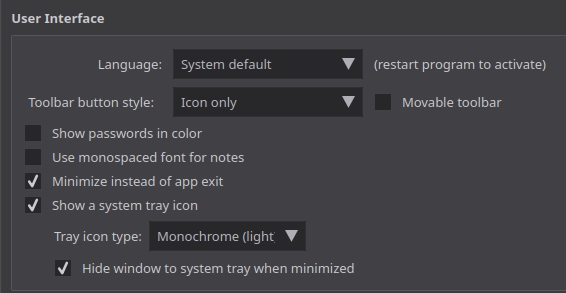
User interface section
-
Minimize instead of app exit
-
Show a system tray icon
-
Hide window to system tray when minimized
Browser integration settings
In this section, it checked the "Enable browser integration" option and the "Firefox" option:
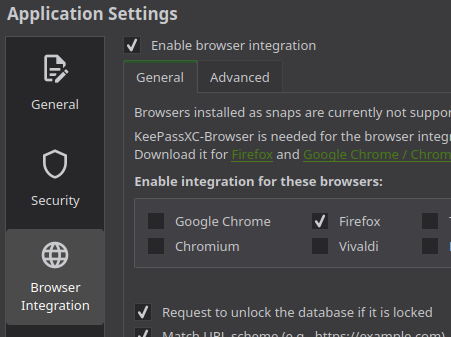
This configuration guarantees that when I close the KeePassXC window, the app keeps running and the Firefox extension is allowed to access the database.
Firefox extension
I have installed the KeePassXC-Browser extension.
Android
I have installed the Keepass2Android Password Safe app and I configured in the settings the option to unlock with my fingerprint in the settings.
👉 Some of these ideas were taken from Reddit.