Linux
👉 Manjaro
👉 Gnome
Crear acceso directo a aplicación
Crea un ficherio nome.desktop no directorio /home/USUARIO/.local/share/applications (so para o usuario actual) ou en /usr/share/applications/ (para todos os usuarios) co seguinte contido:
[Desktop Entry]
Type=Application
Name=NOME APP
Exec=RUTA EXECUTABLE
Icon=RUTA ICONA
👉 Como crear lanzadores en Ubuntu y derivados - Atareao
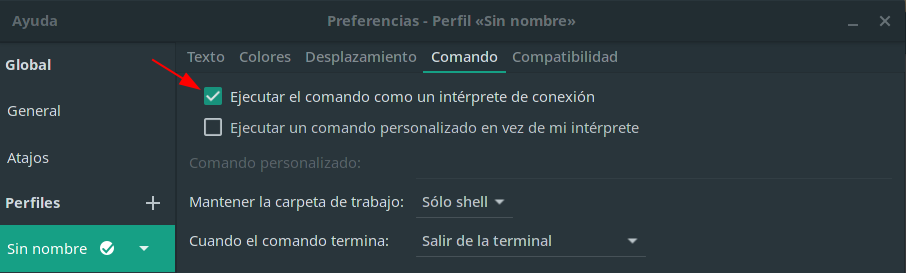
Terminal como login shell
Para executar a terminal como "login shell" debemos activar a seguinte opción de configuración:
👉 Desenvolvemento de extensións GNOME
Which
List the full pathnames of the files that would be executed if the named commands had been run. which searches the users $PATH environment variable.
which [options] [--] [commands] [Options: -a, --all -i, --read-alias --read-functions --skip-alias --skip-dot --skip-functions --skip-tilde --show-dot --show-tilde --tty-only -v, -V, --version --help]
Screen
- Start a new screen session
screen
-
Detach from the current screen session:
Ctrl + a + d -
Show list of screens
screen -r
- Reattach to a Screen session using the PID:
screen -r <24658>
👉 Using GNU Screen to Manage Persistent Terminal Sessions
Get Last Modified Date of File in Linux
stat foo